Two weeks ago, I was developing a web based application that saves data into an Excel file. It will create a new Excel file, add header rows in bold text, sets the column width and saves the data beneath the header.
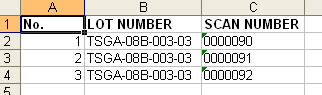
The application is written in Zend Framework. I thought Zend Framework has its own library on writing to Excel, unfortunately, there is none. So I go for PEAR.
PEAR has a package called Spreadsheet_Excel_Writer that can save Excel file without the need of COM components.
*Note: This PEAR package is not maintained anymore so if you want to use it, do it at your own risk.
Spreadsheet_Excel_Writer requires OLE 0.5 or newer and works on PHP 4.1.0 or higher. Of course it need PEAR to make it work.
Making PEAR work with Zend Framework
PEAR and Zend Framework share some similarities with naming conventions, that is why it is not that hard to integrate PEAR to your application. As long as PEAR is included in your include path, wherever it is, it will work with ZF.
I choose not to use PEAR as system wide library. Instead, I placed the whole PEAR directory beside Zend directory under library. You also need to autoload it via Bootstrap.php. My directory structure looks like below:
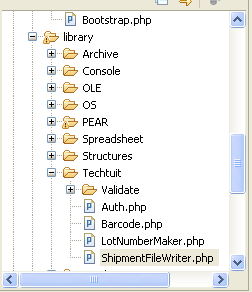
Autoload PEAR at Bootstrap.php:
$autoloader->registerNamespace(‘PEAR_’);
The Code
I have created a class that writes data into an Excel file. For the sake of simplicity, I will rather write the straightforward codes. You can actually view these on the PEAR manual.
//write the full path if you want
$fileName = 'test.xls';
$workBook = new Spreadsheet_Excel_Writer($fileName);

//add a style/format and return its reference
$formatBold =& $workBook->addFormat();
$formatBold->setBold();

//create a worksheet and return a reference
$workSheet =& $workBook->addWorksheet($lotNumber);

//write header
$workSheet->write(0, 0, 'No.', $formatBold);
$workSheet->write(0, 1, 'LOT NUMBER', $formatBold);
$workSheet->write(0, 2, 'SCAN NUMBER', $formatBold);

//set column widths
$workSheet->setColumn(1, 1, 16);
$workSheet->setColumn(2, 2, 14);

//your data is either from the database or from any other source
foreach ($data as $key => $row)
{
	//compute column position
	$x = $key + 1;
	//write now
	$workSheet->write($x, 0, $row['Seq_No']);
	$workSheet->write($x, 1, $row['Lot_Number']);
	$workSheet->writeString($x, 2, $row['Scan_Number']);
}
//closing the workbook will save the excel file to the server
$workBook->close();
could u please tell me how to link the Pear to my zend. (the auto load part)
i tried to use “$autoloader->registerNamespace(’PEAR_’);” this line but since i m using zend framework 1.7 , i guess its not working.
This is how I did it on Zend Framework 1.7.x. The directory structure is still the same, you will just add this to index.php:
require_once ‘Zend/Loader.php’;
Zend_Loader::registerAutoload();
Don’t forget that it is already depreciated.
Hiii,
I just want to know what do I have to do actually. I mean do i need to download PEAR Packages????
You can install PEAR in the command line and install the packages as well. However, this spreadsheet writer is already deprecated long time ago. Take a look at PHPExcel instead from the PHPOffice project.
Can u please tell me do I need to install Pear in Zend’s library??
And do u have any Idea about how can i install it in my fedora’s machine???
Please Help
I installed pear into my machine via command line, then copied it to the library folder to make it portable to other system without PEAR. Not the recommended way by the way.
What you should do is install PEAR via your Fedora system (yum?). From there, you can install the spreadsheet writer via the pear command. Not a Fedora user here so I’m not familiar with your system.
Hi lysender,
I have installed this library via pear command,
Can u please tell me where do i need to place this library in my zend’s project????
And can i give it namespace?????